RAM plays a major role in gaming performance, multitasking, content creation, and overall system responsiveness. Modern games and applications require faster memory speeds and higher capacity compared to previous years, making RAM selection more important than ever in 2026.
Whether you are building a gaming desktop, upgrading a gaming laptop, or improving workstation performance, choosing the right RAM can help reduce lag, improve FPS stability, and support smooth multitasking.
In this guide, we explain the best RAM options for gaming laptops and desktops in 2026, including DDR4 vs DDR5, recommended capacities, memory speeds, and upgrade tips.
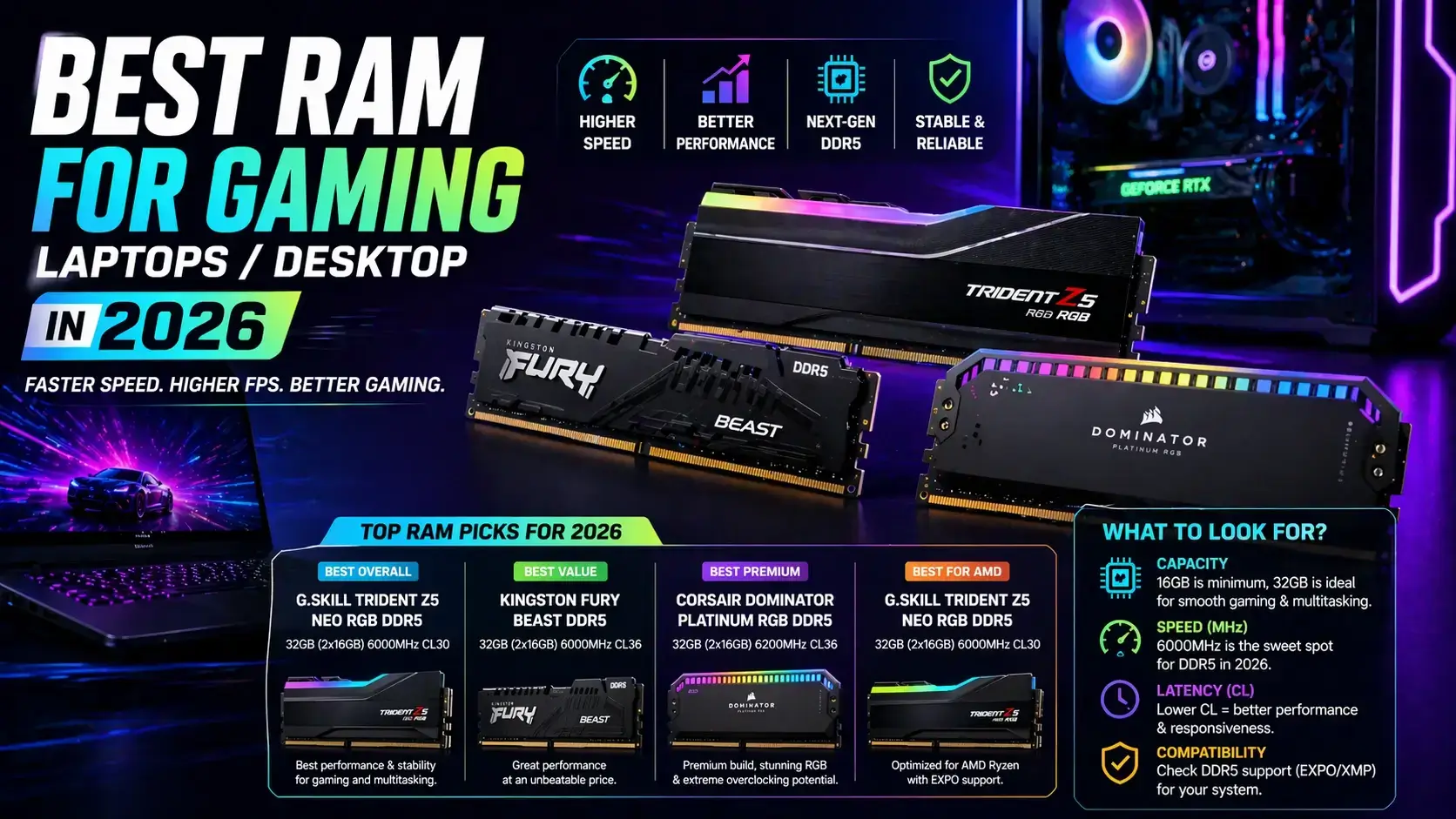
Table of Contents
- Why RAM is Important for Gaming
- DDR4 vs DDR5 RAM
- Best RAM Capacity for Gaming
- RAM Speed and Performance
- Gaming Laptop RAM Recommendations
- Desktop Gaming RAM Recommendations
- Dual Channel vs Single Channel
- Best RAM Brands in 2026
- Should You Upgrade RAM?
- FAQs
Why RAM is Important for Gaming
RAM (Random Access Memory) temporarily stores data used by games and applications while your system is running.
Insufficient RAM may cause:
- Game stuttering
- Slow multitasking
- FPS drops
- Long loading times
- System lag
Faster RAM also helps improve system responsiveness and supports smoother gameplay in modern AAA games.
DDR4 vs DDR5 RAM
DDR5 memory has become increasingly popular in 2026 because of higher speeds and better efficiency.
| Feature | DDR4 | DDR5 |
|---|---|---|
| Speed | 3200–4000 MHz | 4800–8000+ MHz |
| Efficiency | Good | Better |
| Gaming Performance | Strong | Higher potential |
| Price | Lower | Higher |
DDR5 offers better future-proofing, but DDR4 remains a strong choice for budget gaming systems.
Best RAM Capacity for Gaming in 2026
Modern games and multitasking applications require more memory compared to previous years.
| RAM Capacity | Recommended For |
|---|---|
| 8GB | Basic gaming (not ideal) |
| 16GB | Modern gaming standard |
| 32GB | Streaming + content creation |
| 64GB+ | Professional workloads |
For most gamers in 2026, 16GB remains the recommended minimum, while 32GB is ideal for advanced multitasking and streaming.
RAM Speed and Gaming Performance
RAM speed affects data transfer rates between memory and the processor.
Faster RAM can improve:
- FPS stability
- Game loading speed
- Multitasking performance
- System responsiveness
Ryzen processors often benefit more from faster RAM speeds compared to older platforms.
Best RAM for Gaming Laptops
Gaming laptops typically use SO-DIMM memory modules and often have limited upgrade slots.
Recommended configurations:
- 16GB DDR5 for modern gaming
- 32GB for streaming and editing
- Dual-channel configuration preferred
Many newer gaming laptops now include DDR5 memory as standard.
Best RAM for Gaming Desktops
Desktop systems offer more flexibility for RAM upgrades and higher speed memory kits.
- DDR5 6000MHz+ for high-end gaming
- DDR4 3600MHz for budget builds
- 32GB preferred for multitasking setups
High-performance gaming desktops can benefit from advanced memory tuning and XMP profiles.
Dual Channel vs Single Channel RAM
Dual-channel memory configuration improves bandwidth and system performance compared to single-channel setups.
| Configuration | Performance |
|---|---|
| Single Channel | Lower bandwidth |
| Dual Channel | Better gaming performance |
Using two RAM sticks instead of one can improve gaming FPS and multitasking performance.
Best RAM Brands in 2026
Several manufacturers continue to dominate the gaming RAM market in 2026.
- Corsair
- Kingston Fury
- G.Skill
- Crucial
- ADATA XPG
These brands offer both budget and premium gaming memory solutions.
Should You Upgrade Your RAM?
If your laptop or desktop feels slow during gaming or multitasking, upgrading RAM may improve performance.
RAM upgrades are especially useful if:
- Your system only has 8GB RAM
- You stream games
- You edit videos or use creative software
- You multitask heavily
Combining RAM upgrades with SSD upgrades can significantly improve overall performance.
RAM Upgrade Services in Gurgaon
IT WORLD THE COMPUTER ITSOLUTION provides RAM upgrades, gaming laptop optimization, SSD installation, and hardware upgrade services in Gurgaon.
Upgrade Your LaptopFrequently Asked Questions (FAQs)
Is 16GB RAM enough for gaming in 2026?
Yes, 16GB remains the recommended standard for modern gaming.
Is DDR5 better than DDR4?
DDR5 offers higher speeds and better future-proofing, but DDR4 still performs well for budget systems.
Does RAM speed affect FPS?
Faster RAM can improve FPS stability and system responsiveness.
Should I use dual-channel RAM?
Yes, dual-channel memory improves bandwidth and gaming performance.
Can RAM upgrades improve laptop speed?
Yes, upgrading RAM often improves multitasking and overall responsiveness.